4 YouTube Tools: 90 Min/Video, $11,400 in Month 4
It was a Tuesday in January.
Kelly had just uploaded her 19th video. Four months in. No studio, no team, no editor.
Views that week: 600. Revenue: $0.
She had a script workflow. She had a voiceover. She had a decent thumbnail. What she did not have was any idea whether anyone actually wanted to watch the topics she was choosing.
Month four ended at $11,400.
One thing changed. Here is what it was.
The Mistake Killing 90% of AI YouTube Channels
Every AI YouTube tutorial covers the same ground: pick a niche, write a script, record a voice, edit in CapCut, upload and repeat.
None of them answer the question that actually determines whether your channel grows: what should you make?
YouTube's algorithm makes its promotion decision in the first 24 to 48 hours after upload, based primarily on click-through rate and audience retention. Channels that consistently hit 6%+ CTR with 50%+ retention get fed into recommendation loops. Channels that miss those thresholds get buried.
The difference between hitting and missing is almost always the topic, not the production quality.
Creators who outperform their subscriber count by 10x to 70x are not making better videos. They are making videos on topics the algorithm is already pushing. They found a signal before they filmed. That is the entire game.
What Tukey AI Does (And Why It Is Step 0, Not Step 1)
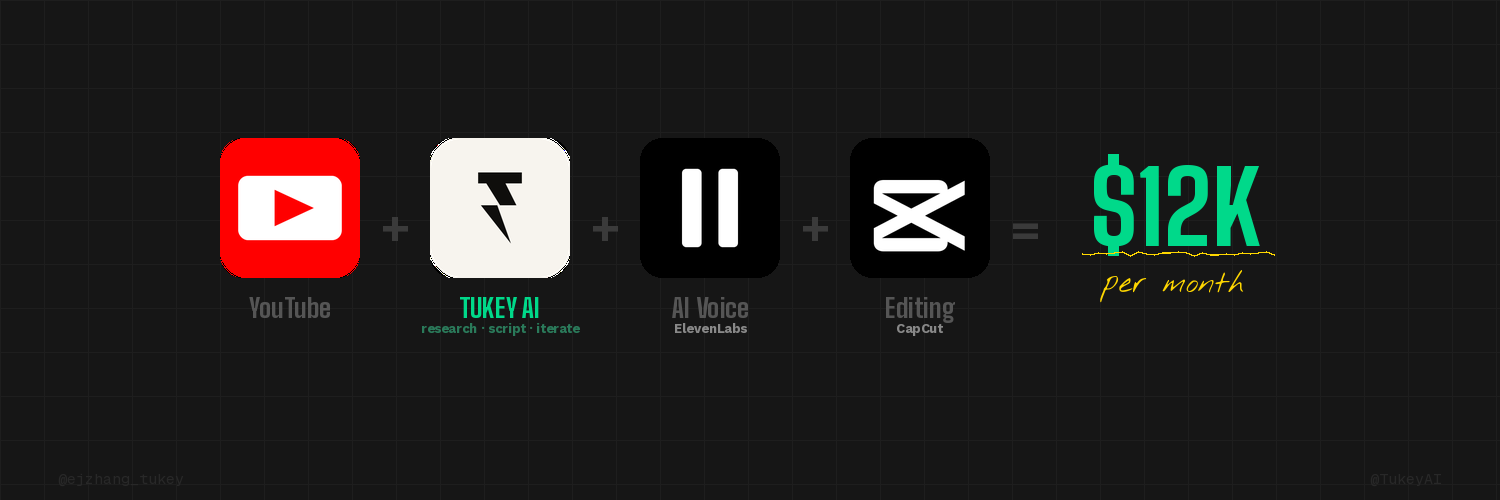
Tukey AI is a research and scripting engine built specifically for YouTube.
Before you write a single word, Tukey surfaces the outliers in your niche: videos from small channels pulling views far beyond what their subscriber count predicts. A 3,000-subscriber channel with 280,000 views on one specific topic. A format winning across five creators simultaneously. A question the algorithm is actively amplifying right now.
That is not a guess. That is validated demand from real viewer behavior.
Once you select the winning angle, Tukey generates a complete word-for-word script: hook-first structure, open loops in the body, spoken-English phrasing, embedded visual cues, soft close. You edit inline, comment on specific sections, regenerate any part that is not landing, and iterate until it is exactly right. All inside the same tool.
By the time you open CapCut, the topic is validated and the script is done. You are assembling, not deciding.
The Full Stack (90 Minutes Per Video)
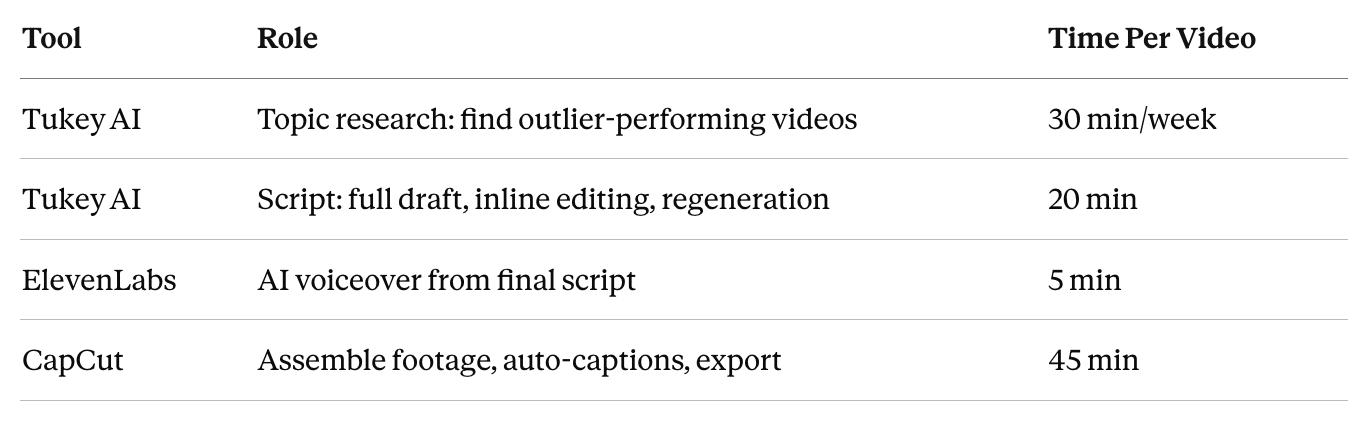
Total: 90 to 100 minutes per video. Two videos per week = under 4 hours of work.
For camera creators, ElevenLabs drops out entirely. Tukey finds the topic, writes the script, you film.
Step 1: Find What Is Already Winning in Your Niche
Open Tukey. Search your niche.
You are not looking for the biggest channels. You are looking for outliers: videos with view counts that make no sense for the channel's subscriber base. A 4,000-subscriber channel pulling 220,000 views on one video is a strong signal. The algorithm pushed that content well beyond its baseline, which means the topic-format combination has proven demand.
Find three to five of these. Identify what they share: format (list, story, breakdown, tutorial), tone (urgent, calm, educational), depth level, underlying viewer problem.
That pattern is your editorial direction for the week. That is what you bring into Tukey to script from.
Step 2: Script and Refine in Tukey
Tukey writes a complete word-for-word script optimized for YouTube retention:
The first 30 seconds open on a hook or story drop, no intro. The body uses open loops to hold viewers to the end. Language is spoken English, short sentences, no paragraph-length explanations. Visual cue tags are embedded throughout. The close is a soft call to action.
After the first draft, iterate inside the tool. Comment on sections, regenerate the hook, punch up the open, tighten the close. Lock a final script in 20 minutes or less.
Step 3: Voiceover in ElevenLabs (Faceless Channels Only)
Paste the final script into ElevenLabs.
Skip the default voices. Adam and Rachel are running on thousands of channels right now and audiences recognize the pattern instantly. Test newer voices or clone your own from a 5-minute recording. The voice is the cheapest differentiator available and most creators ignore it. A distinct voice lowers the skip rate in the first 10 seconds.
Export as MP3.
Step 4: Assemble in CapCut
Import the voiceover into CapCut. Pull stock footage from Pexels or Pixabay (both free). Match footage to the visual cue tags in your Tukey script.
Enable auto-captions. Large, centered, high contrast. Captions increase average view duration by 15 to 20% on mobile, which accounts for 70%+ of total YouTube viewership.
Target runtime: 8 to 14 minutes. Under 8 minutes removes mid-roll ad eligibility. Above 14 minutes hurts retention rates on newer channels.
What the Income Looks Like
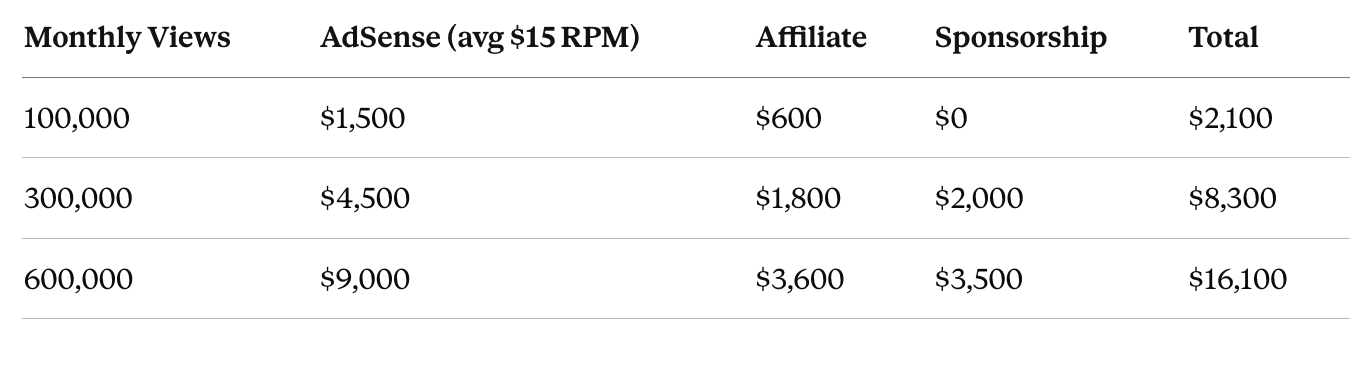
RPMs by niche in 2025: Finance and business $18 to $25. AI and tech $12 to $18. Health and wellness $15 to $22. Entertainment $3 to $8.
Timeline with two videos per week and Tukey-driven topic selection: most channels reach 100,000 to 200,000 monthly views between month 3 and month 5. A breakout video in that window can push 300,000 to 500,000 by month 6 to 7.
YouTube monetization threshold: 1,000 subscribers and 4,000 watch hours. With validated topics, most channels hit that threshold in month 3 to 5. Affiliate revenue has no threshold and can start on video one.
The 5 Things That Kill This System
1. Skipping topic research. Using Tukey for scripting but ignoring discovery. The topic determines whether the algorithm promotes the video. The best script on the wrong topic still fails.
2. Weak hooks. YouTube evaluates the first 30 seconds using early retention signals. A hook that does not hold attention in the first three sentences costs you promotion. Regenerate it before touching anything else.
3. Quitting before video 20 to 30. YouTube classifies channels after sufficient upload history, typically 20 to 30 videos. The algorithm pushes content more consistently after this window. Channels earning $10,000+ per month are still publishing at video 25.
4. Default ElevenLabs voice. Sounds identical to hundreds of other channels. Differentiation is free and most creators skip it.
5. Single revenue stream. AdSense alone is not a business. Affiliate links from video one and one sponsor per month after 10,000 subscribers is typically the difference between $3,000 and $11,000 per month at the same view count.
What to Do This Weekend
Saturday morning (30 min): Open Tukey AI. Search your niche. Find three to five videos dramatically outperforming their channel size. Write down what they share: format, tone, depth, viewer problem.
Saturday afternoon (20 min): Pick the strongest angle. Let Tukey write the first draft. Edit inline, regenerate the hook, lock the script.
Saturday evening if faceless (5 min): Generate the voiceover in ElevenLabs.
Saturday to Sunday (45 min): Assemble in CapCut. Export. Upload.
By Sunday night, your first Tukey-driven video is live. The channels at $10,000 to $20,000 per month are running this system 30 to 50 times in a row, with Tukey finding a new validated angle every week.
The research gap is why most AI YouTube channels die. Tukey closes it.
Frequently Asked Questions
What makes Tukey different from ChatGPT or Claude for scripting?
General AI tools write whatever you ask. Tukey writes YouTube scripts specifically, optimized for hook structure, watch time signals, and the retention patterns the algorithm rewards. More importantly, Tukey surfaces what to write about using real outlier performance data from your niche. General-purpose AI cannot do that.
How long before the channel earns money?
YouTube monetization requires 1,000 subscribers and 4,000 watch hours. Most channels using Tukey-driven topics and two videos per week hit that threshold between month 3 and month 5. Affiliate revenue can start on day one with no threshold.
Do I need a camera?
No. Faceless channels use Tukey for research and scripting, ElevenLabs for voiceover, and CapCut for assembly. Camera creators drop ElevenLabs entirely: Tukey writes the script, you film.
What niches work best with this stack?
Any niche where Tukey's outlier data shows consistent over-performance. Higher-RPM niches (finance, AI, business, health at $12 to $25 RPM) maximize income per view. But the research signal matters most. A topic the algorithm is actively pushing in any niche beats a generic topic in a high-RPM niche.
How often should I do topic research in Tukey?
Once per week. Thirty minutes every Monday: scan for outlier videos, pull three to five winning angles, script and batch. Spend the rest of the week assembling, not researching.
I built @TukeyAI because topic research is the step that kills most AI YouTube channels. Find what is already winning in your niche before you film.